AppsServicesAboutSupport Contact

SumantKushwaha.dev@gmail.com

Home/Apps/Recline

Recline

Phone Dialer & Call Manager
Live on Google PlayFreeAndroid 7.0+No account needed

Android's stock dialer answers calls. Recline manages them — who gets through, when, what they hear back, what the screen looks like, and whether the conversation gets recorded. All configured on your device; your calls, contacts and recordings are never uploaded.

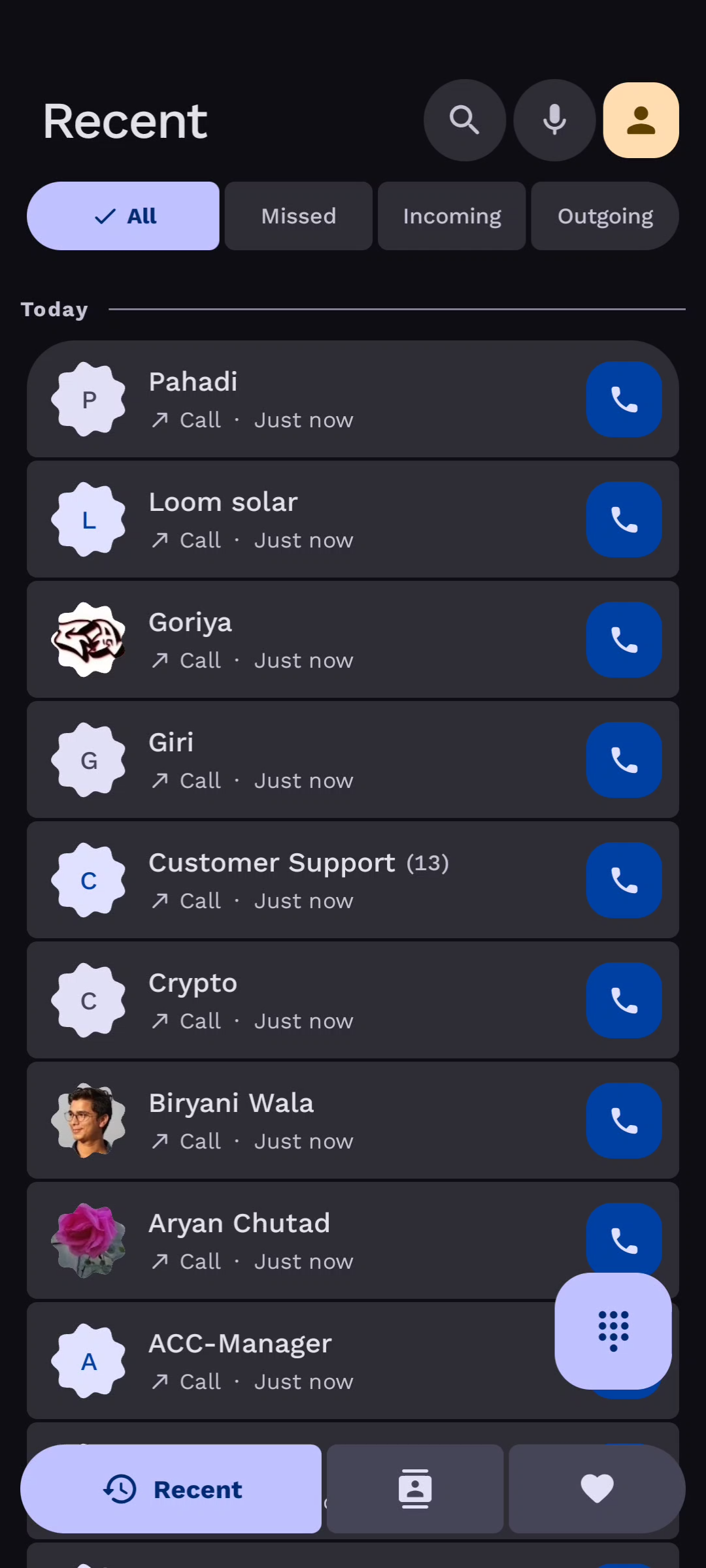
Recline app screenshot
Package
com.amigo.dialer
Platform
Android 7.0+
Price
Free, optional Premium
Account
Not required
Data
Calls & contacts stay on device
The headline feature

Real call recording, without the usual compromise

Android blocks call-audio recording for ordinary apps, and Google Play removed the accessibility-service loophole. Recline takes a different route entirely.

Recording is handled by a separate companion app — Recline Helper — which runs a small, tightly scoped background service with the elevated access Android requires for call audio. It captures the audio and hands it back to the dialer.

The result: the dialer itself never records audio and uses no accessibility service — its microphone permission is only for voice commands — and still records genuine two-way audio. The elevated component does one job and nothing else — capture.

How Recline Helper works
01

Recline Dialer

Call UI, logs, contacts, recording controls and playback. Never records audio itself.

02

Verified link

The two apps confirm each other before any audio moves between them.

03

Recline Helper

The capture service, plus encoding and on-device storage.

Full feature list

Everything in the app

Six groups, and every item below is shipping today.

Core calling

  • Smart dialpad with T9 search and live contact matching
  • Dual SIM support with default and per-call SIM selection
  • Grouped call logs with colour-coded call type indicators
  • Per-number call history with quick actions
  • Favourites and speed dial
  • USSD and secret code handling
  • Your last call with a number, right on the incoming screen
  • After a call: call back, message or save the number in a tap

Contacts & identity

  • Create, edit and search contacts with account-aware updates
  • Per-contact ringtone and call background
  • Contact photo preloading for a smooth call screen
  • Block, share, edit or add-to-contacts from any call
  • Global E.164 normalisation via libphonenumber
  • Favourite toggle and one-tap call actions
  • Filter contacts by account, and search your work directory

In-call UI & themes

  • Material 3, Original, Modern and Google-style in-call screens
  • Five answer styles: Material 3, Original, Pulse, Google and iOS
  • An optional call bubble at the screen edge for incoming calls
  • Audio routing: earpiece, speaker, Bluetooth, wired
  • Hold, mute, keypad, add call, merge and swap
  • Custom call backgrounds — image or video
  • Blur and dim controls for readability

Privacy & screening

  • Blocked numbers with configurable reject rules
  • Reject unknown callers, or allow-only mode
  • Auto-reply to missed calls, declined calls or both, and quick replies
  • Incognito calling for private outgoing calls
  • Secret call mode with an optional hidden call overlay
  • Sleep Control schedules with contact exceptions
  • Silent all calls — always, on a schedule or at places you pick on a map
  • Hide my number on every call, where your carrier allows it

Recording

  • Real two-way audio — uplink and downlink mixed to mono
  • The dialer never records audio itself and uses no accessibility service
  • Start and stop recording from the in-call screen
  • Recordings list with playback, share and delete
  • Auto-record rules and live recording-state sync
  • Everything stored on-device, as M4A or Opus
  • Transcripts made on the phone, and auto-delete after 7, 30 or 90 days

Utilities

  • Fake Call scheduling with a custom caller profile
  • Call forwarding controls from settings
  • Call announcer reads the caller's name aloud
  • Notification actions for missed and ongoing calls
  • Quick decline messages
  • Room-backed cache with observer-based sync
Permissions

What each one is for

What a default dialer genuinely needs, and nothing beyond it.

PermissionWhy it's needed
Phone & CallMake, receive and manage calls as your default dialer.
ContactsShow names and photos, and edit contacts when you do.
Call LogShow recent calls, delete entries, and tidy incognito calls and caller ID codes.
NotificationsIncoming, missed and ongoing call alerts, and reminders.
SMS (send only)Send the auto-reply and quick-reply messages you configure.
MicrophoneVoice commands only — the dialer never records audio.
BiometricsConfirm it's you before an authenticated call is answered.
Exact alarmsCall-back reminders and scheduled fake calls.
Location (optional)Silent all calls at places you pick — including in the background, if you allow “all the time”.
Display over other apps (optional)The incoming-call bubble, if you turn it on.
Write SettingsApply a custom ringtone you selected.
InternetAds you choose to watch, the Premium check, referrals, feedback, crash and usage reports, and the map for picking places.
Foreground ServiceKeep the call screen and fake-call timer alive.
Privacy at a glance

Your calls stay yours.

Recordings are encoded and stored on your device, and only Recline can open them — no other app on your phone can read them, and nothing is uploaded to any server of mine. Contacts, call logs and notes never leave the phone either. What does go online — ads you choose to watch, crash and usage reports, the Premium check, referrals and feedback — is listed in full in the privacy policy.

  • Recordings never leave your device
  • No contact or call-log upload
  • Ads only when you choose to watch one
  • No Recline account, ever
Download

Make it your default dialer

Free, no account needed, optional Premium. Android 7.0 and newer. Install the Helper too if you want call recording.